Define Fields for Barcode Generation
This section describes how you can define which values (or information) from fields should be displayed as barcodes.
We have compiled some use cases for you to give you a better understanding of how you can use the extension.
Barcodes for Item Nos.
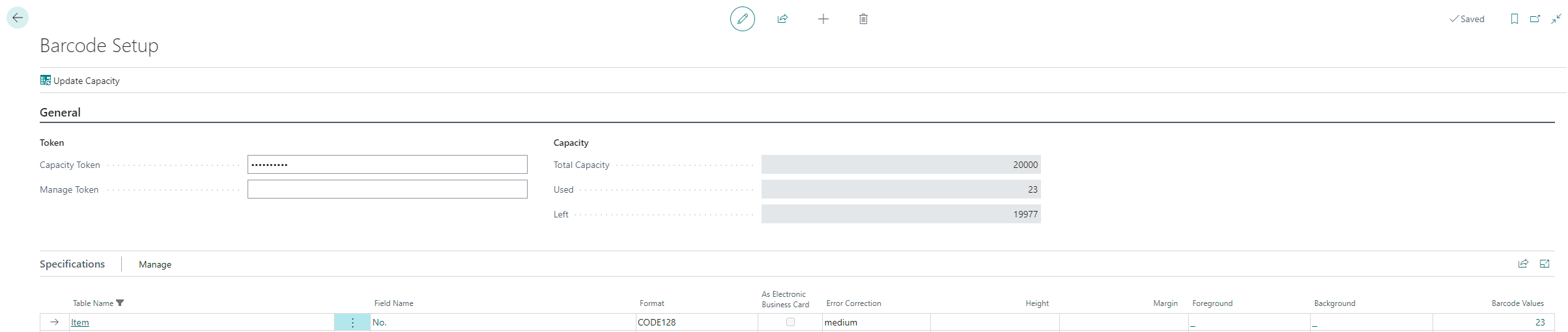
Barcodes are often used to represent item numbers. The following use case describes how to set up the extension to generate item numbers as barcodes in Business Central.
To define that item numbers are generated as barcodes, do the following:
- Open the search function (ALT+Q) 🔍 from the role center.
- Search for Barcode Setup and click on the corresponding search result.
- The Barcode Setup page is displayed.
- Scroll down to the Specifications table and click on New Line.
- A new line is added to the table. Add the following information:
| Column | Description |
|---|---|
| Table Name | In this field you specify the table from which you want a field information (to be generated as a barcode) to come from. In our example, you would specify the Item table (ID: 27). |
| Field Name | In this field you specify the field of the table in which a value is to be created as a barcode. In our example, you would specify the No. field (ID: 1). |
| Format | In this field you define the format of the barcodes to be generated. You can choose between 15 different formats (including QR codes). In our example we use the Code128 format. |
| As Electronic Business Card | Select this checkbox if you want an electronic business card to be created. This option should be enabled only if you want to exchange contact information. For our example, this option should not be enabled. |
| Error Correction | In this field you can define the error correction for the barcode generation. The default setting is medium. |
| Height | In this field you define the height of the barcodes in pixels. If you do not define a height, the default setting is used. The default setting is 100 pixel. |
| Margin | In this field you define the margin of the barcodes in pixels. If you do not define a margin, the default value is used. The default value is 10 pixels. |
| Foreground | In this field you define the color of the barcodes. If you do not define a color, the default setting is used. The default setting is black (#00000). |
| Background | In this field you define the background color of the barcodes. If you do not define a background color, the default setting is used. The default setting is white (#ffffff). |
| Barcode Values | This field is automatically filled by the system. This field displays the number of generated barcodes in the system for the table an field combination. |
| Do not print caption | This check box allows you to specify whether the value of the barcode should be printed as human-readable information (for example, the item number). |