Assign User Permissions
The following description shows how to assign user permissions for the Beyond Catalog V2 extension. The permission sets provided are:
| Permission Set | Description |
|---|---|
| BYD CL READER | This permission set allows you to read data from the Beyond Catalog V2 app. |
| BYD CL USER | This permission set enables the use of the Beyond Catalog V2 extension. |
| BYD CL ADMIN | This permission set allows you to read and edit data from the Beyond Catalog V2 app, including the setup page. |
To assign the permission set for Beyond Catalog V2 to a user, proceed as follows:
- Open the search function from the role center (ALT+Q).
- Search for Permission Sets and click on the appropriate search result.
- The Permission Sets page is displayed.
- Select one of the above permission sets from the list.
- Click Related > Permissions > Permission Set by User in the menu bar.
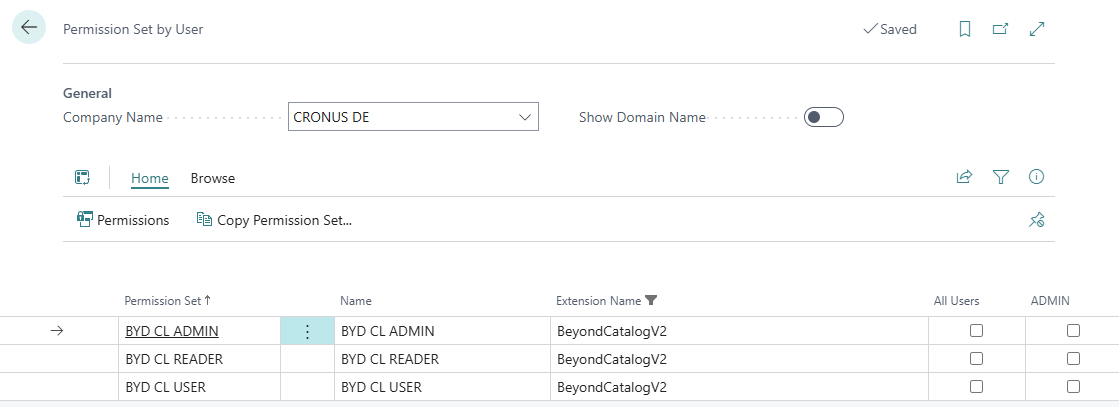
- The Permission Set by User page is displayed.
- Show the filter area (SHIFT+F3) and pick Extension Name and the value Beyond Catalog V2 as filter criteria.
- The list is filtered to the permission sets of Beyond Catalog V2.
- Select the check box on the right side of the page for the user or users to whom you want to assign the permission set.
You have assigned a permission set for Beyond Catalog V2 to a user. Note that users with the SUPER permission set have all rights, i.e. you do not need to give this user any additional rights.